The car fades in, drives in or sits there from the start. What now?
Updated:
Short answer
Video models find the reveal the toughest beat. So the car may fade in, drive in or already be standing behind you at frame one. A clean waist-up photo without a car in it helps most. Run again if you must. A softer reveal in a finished video is simply how that run came out.
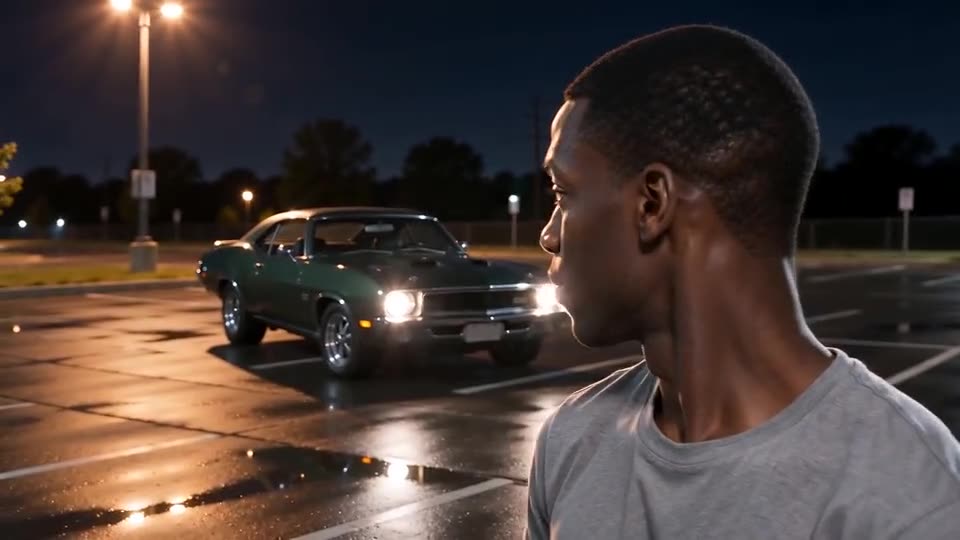
What a good run shows
- Space behind you starts out empty, and you look into the lens.
- Two green number cards rise to the lens, then leave the frame in a single move.
- The car you picked is there, a few metres behind you, lights on.
- You glance back at it. Then the reaction: a calm half-smile with a small wave, or both hands on your head in shock.
What goes wrong
- One unbroken shot. A car has to appear with no cut, so the model sometimes blends it in.
- A car in your photo. The model may leave it in the background from frame one.
- A very short preview. The 5-second preview squeezes the beats. Cards and car can blur together.
What to try
Retake the photo against a bare backdrop. Nothing parked behind you. Each run differs, so another one often reveals more cleanly. One more full video costs 1 credit.
Questions people ask
Is a slow fade-in a failed video?
No. A run counts as failed only when it never finishes. Then the credits return automatically. A softer reveal in a finished video is just how that run turned out.
Can the car show up sooner or later?
No. The fixed scene sets the timing, and the site has no control for it.
Does the full video land the reveal better than the preview?
Mostly, because it has more room for the beats. Judge your face and the overall feel from the preview.
Reveal your own car
Send one photo. Skip the subscription. The full video has no watermark.
Make my video