A copy-ready Kling prompt for Alors on Danse, no names inside
Updated:
Short answer
Use the text below in Kling, with both photos attached as references. The studio, both roles and the sequence of beats are spelled out, with no song or artist named, because tools often filter names. Set the duration your plan permits, or skip all that with Ozil Goal AI.
Prompt text
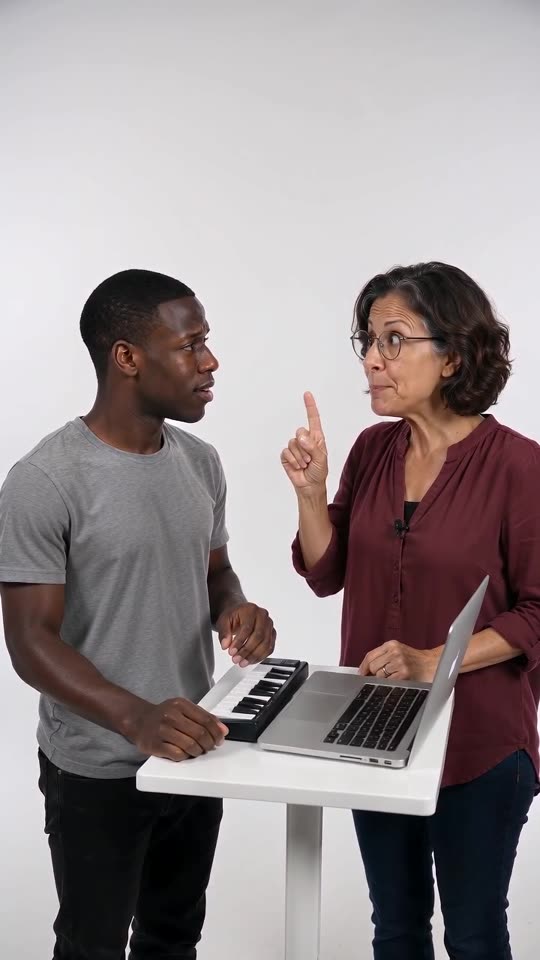
Setting: a bright, plain white photo studio, one fixed medium shot. On a small white table: an open silver laptop and a compact mini synth keyboard. Two characters stand behind it, shown from the waist up. The one from image 1 is on the left and is the PLAYER; the one from image 2 is on the right and is the HYPE partner. Each keeps the face, hair or fur and clothes of their own image exactly.
To begin, the HYPE partner bends over the keys, finger jabbing, and mouths out a beatbox pattern. The PLAYER's hands stay on the keyboard and the face stays totally blank, while the HYPE partner nods along to the rhythm. The beat then cuts away, and the PLAYER looks up with a puzzled "huh?". After that the HYPE partner's index finger pumps up and down, again and again, along with a hummed bouncy synth tune. At the end a loud synth riff hits, the PLAYER slams down on the keys, and the HYPE partner strikes a cool, pleased pose.
Audio: nothing but beatbox, an original electronic beat and a synth riff. No singing, no lyrics. Keep the image free of text, logos and watermarks. Anyone who speaks does so in English only.
Tips for using it
- Order counts: the Player photo goes first, the Hype partner photo second.
- Don't include song or artist names. Filters often catch them.
- Limits move around, so use the length your plan permits.
Questions people ask
Will the result line up with the trending sound?
Only roughly. Text can't pin every beat to the second, so Ozil Goal AI relies on a pre-timed template.
Can the prompt handle animals?
Yes. Include a line that the pets stand upright and press keys with their paws.
Do I have to prompt on this site?
No. Ozil Goal AI works from a fixed scene. Add two photos, click the button.
Take the keyboard yourself
Upload two photos and the studio scene is built around them. No watermark on the paid video, and nothing to cancel later.
Make my video