Alors on Danse as a Veo prompt, names left out
Updated:
Short answer
Put the text below into Veo, and add both photos as starting images if your plan takes two. One paragraph holds the studio, both roles, the beats and the sound. It leaves out every song and artist. Trim it to suit your plan, or let Ozil Goal AI take care of the timing.
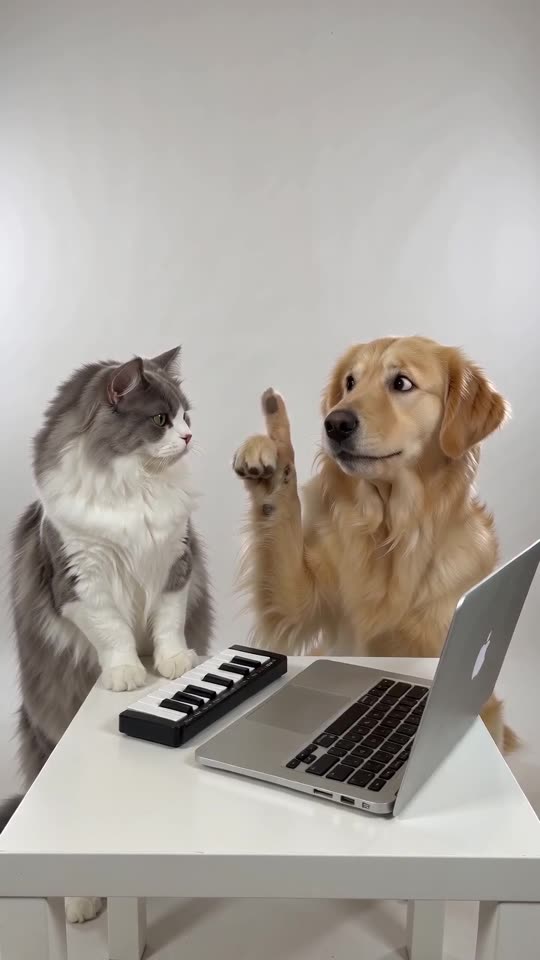
Prompt text
A brightly lit, plain white photo studio, filmed in a single fixed medium shot. At a small white table with a silver laptop and a compact mini keyboard there is a calm musician, and right next to them an excitable friend. When an electronic beat starts, the friend leans in over the keys, finger jabbing and beatboxing, and the musician keeps playing with zero change of expression. All at once the beat cuts and the musician glances up, baffled: "huh?". Then the friend's finger shoots up, quicker and quicker, as a bouncy synth melody is hummed; the musician just waits, hands on the keys. The ending is a bright synth riff: the musician hammers the keys, the friend locks into a cool, contented pose. Only beatbox, an original electronic beat and a synth riff make up the soundtrack. Nobody sings and there are no lyrics. Nothing written in the picture, no logos, no watermark. Anyone who speaks does so in English only.
Tips for using it
- With a one-image plan, describe each person or pet in a handful of words.
- Don't put any song or artist name in.
- Limits move around, so use the length your plan permits.
Questions people ask
Will Veo keep the two faces apart?
It varies with your plan and the number of reference images it allows. Find out before you spend credits.
Is it going to match the trend precisely?
No. Treat the prompt as somewhere to start.
Are prompts needed on this website?
No. Ozil Goal AI works from a fixed scene. Add two photos, click the button.
Take the keyboard yourself
Upload two photos and the studio scene is built around them. No watermark on the paid video, and nothing to cancel later.
Make my video