How can I get a Bama Bound video out of my photos?
Updated:
Short answer
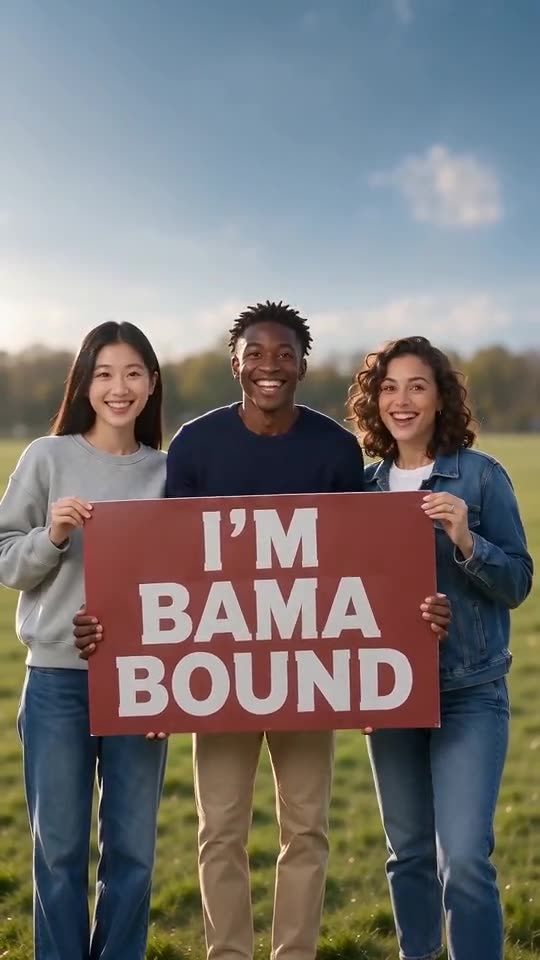
Load one to four photos in left-to-right order and Ozil Goal AI sets up the lawn around them. Pick the sign words and look over a 5-second bonus preview; the 12-second 720p video then costs 1 credit. You write no prompt, and you may leave the page while it renders.
Walkthrough
- Head to the generator from the template page and upload photo number one. No other photo is compulsory.
- Bring in friends or pets with the “Add another person” button, four photos at most, in the left-to-right order you want.
- Wording and setting: pick I'M BAMA BOUND, I GOT IN!, COLLEGE BOUND, FULL RIDE! DREAM SCHOOL or your own text, followed by a sunny lawn, campus lawn, beach or rooftop. Then decide what everybody wears, from the clothes in your photos to graduation gowns.
- Aspect ratio: 9:16 suits TikTok, Reels and Shorts, while 16:9 suits YouTube and computers.
- Confirm consent for your photos in the tick box, sign in with Google and run a bonus preview (5 seconds, 480p).
- Render the full video with 1 credit and save the MP4.
What is already decided for you
One scene holds the static camera, the lawn, the red sign, the lift overhead and the jumping, all modelled on the viral clip. There is nothing to write; your photos only decide who stands where.
Since the moves come in a fixed order, the trending sound fits if it begins at 0 seconds. Faces, fur, motion and sign lettering still shift between runs, so look at the preview.
When it is done
The finished video lands in My videos, ready to download or share by link. For the audio side, read the sound guide.
Ozil Goal AI works on its own and has no tie to any university or to the people who posted the original clips.
Questions people ask
Must I type a prompt?
No. The fixed setup provides the lawn and the camera, so you only choose photos, sign words, place, outfit and format.
Is going solo allowed?
Yes. One photo gives you one person with the red sign, and every extra photo adds a person beside them.
Is it fine to leave the page during rendering?
Yes. Rendering continues on our side, and the result lands in My videos on your account.
Vertical or wide: which one do I choose?
Go 9:16 for TikTok, Reels or Shorts and 16:9 for YouTube or desktop. A preview can be run in either shape.
Hand your crew the red sign
One to four photos in, 12 seconds of HD video out, from $8.88. Nothing to subscribe to, and the end result is watermark-free.
Make my video