Sofa Outfit Change AI: Four Looks, One Ceiling Fan
Also called: Ceiling Fan Outfit Transition, Fan Blade Outfit Change, Rug And Sofa Outfit Trend, Four Looks Fan Transition, Overhead Fan Wardrobe Swap
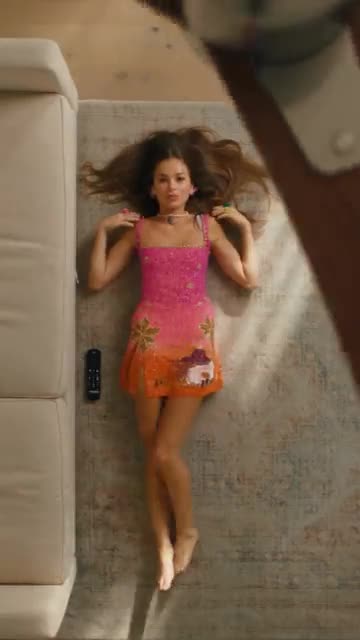
Upload one photo of an adult and Ozil Goal AI lays you on a rug beside a sofa, filmed from straight above. A ceiling fan blade drifts across the lens, and when it clears you are wearing something new, four times in a row, until the last look lands on a long evening gown. Choose the four looks, the sofa and the light. The file has no soundtrack, so add the sound you like in TikTok.
- 10s HD clip from $8.88 · a bonus preview in every pack
- Takes 1 photo
- Vertical 9:16 MP4
- No watermark on the download
TikTok
@ramendik
Original trend on TikTok
The post we follow, played straight from TikTok. Your clip is built from your own photo.
Something not right with your video? Write to support@ozil-goal-ai.app and a person will take a look.
Trending AI templates
More viral video templates you can make from your own photos. Credits work on every template.

Bby Wow Guy AI
9s · 1 photo

Driver Put Phone Away AI
14s · 1 photo

Hit the Road Dude
15s · 1 photo







What each template does
- Christmas Green Dress AI: A gown, a long train and a staircase full of wreaths. One photo does it.
- Spooky Scary Skeletons: Do the skeleton dance as a caped vampire, moon and all. One photo.
- Enchantress Witch Filter AI: One photo turns into the Enchantress witch transformation: eyes shut, a dark claw takes your hand and wipes across the lens, and you return as a moon witch in a gold crescent crown.
- Magic Double Dance: A sketch version of you steps out beside you, high-fives and dances in sync. Build it from one photo.
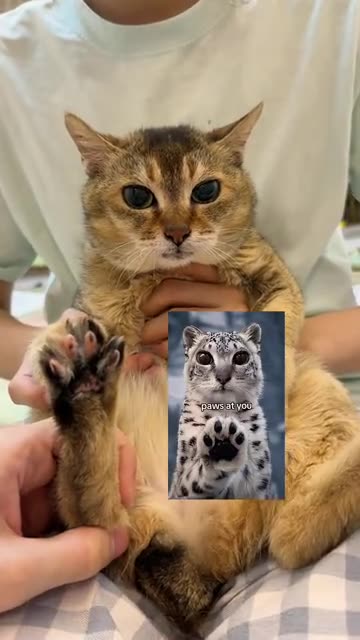
- Snow Leopard Paws At You: A big-eyed pet sitting upright, patting a paw toward you. Build it from one pet photo.
- Dog Pool Party: A pet in swimwear rises onto its hind legs, wiggles and spins. Build it from one photo.
- Angel of My Dreams: Giant white wings open behind you, feathers drift and a diamond glints. All it takes is one picture of an adult or a pet.
- Bby Wow Guy AI: Cut across the dance floor. Bite. Freeze on the lens. One picture does it.
- AI Police Running: A market sprint, a leap onto a bus roof and a billboard climb. A film-stunt style action clip from one photo.
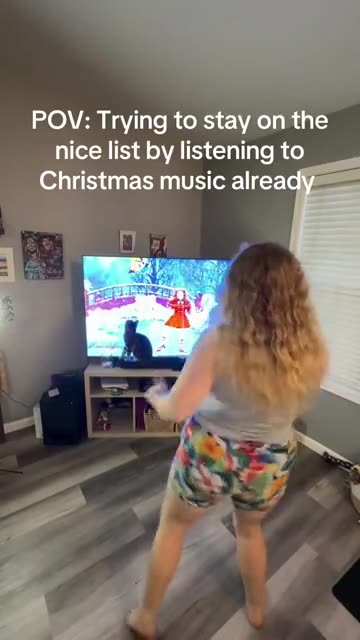
- Santa Tell Me Dance: A solo Christmas dance at home in front of the TV, ending with a turn to the camera. Made from one photo.
- Driver Put Phone Away AI: One photo, one angry minibus driver: you glance back, spin round, open both hands and tell the camera to put the phone away, then face the road again.
- Hit the Road Dude: Lean out of the window and wave them off. One photo.
Three steps from one photo to a wardrobe spin
No filming and no typing.
Add one photo
Use a sharp photo of one adult with the face clear. A shot that shows the shoulders and hair gives the cleanest result. JPG, PNG or WebP, up to 10 MB.
Pick the wardrobe
Choose a set of looks, a sofa and a light, tick the consent line and sign in with Google. Each pack carries bonus 5-second previews, so you can see the first outfit change before a credit goes.
Render, then add sound
The 10-second 720p render uses 1 credit. You can close the tab, because the finished file waits in My videos. Pick the sound when you upload to TikTok.
How to add the original sound in TikTok
Your video comes with an AI-made soundtrack. If you would rather use the trending sound, add it inside TikTok when you post. You can also save a copy without sound from My videos (Download without sound) and put the original sound on that.
- Open this clip in TikTok: our video follows it. Tap the sound name at the bottom, then tap Use this sound.
- Tap Upload and pick the video you downloaded from us.
- Open Volume and turn the video's own sound down to 0, or use the Download without sound copy from My videos.
- To line up the beat, use the scissors (trim) so the sound starts at 0 seconds, then post.

Need to move where the sound starts? This short video shows how to trim it.

Video: How To Trim Sound On TikTok 2026 (Very Easy) by Software Solutions on YouTube
Credits, no subscription
Each clip costs credits, and nothing renews monthly. One 10-second Sofa Outfit Change video takes 1 credit.
1 credit
$8.88
Up to 1 video
Every template: 1 credit per full video
Includes 1 bonus preview
One-time payment, no subscription
- Most popularSave 37%
3 credits
$16.88
Up to 3 videos
Every template: 1 credit per full video
Includes 3 bonus previews
One-time payment, no subscription
- Best valueSave 42%
5 credits
$25.88
Up to 5 videos
Every template: 1 credit per full video
Includes 5 bonus previews
One-time payment, no subscription
- Secure checkout by Waffo
- Credits arrive instantly
- Unused packs refundable within 7 days
- Failed renders are refunded
Where this trend comes from
Use this sound: your video is timed to it, from 0s
@ramendik · TikTok · Oct 8, 2026 · The post we follow: an overhead shot of a person lying on a rug beside a sofa while a ceiling fan blade sweeps across the lens and the outfit changes after each sweep, four looks in all, ending in a long evening gown. It runs about 15s and had about 1 million plays on 12 November 2026. Its caption is a string of search words about a fan outfit transition and an AI tutorial. We follow the whole post, played a little faster.
Links open the original posts on their own platforms. We are not affiliated with these creators.
Sofa Outfit Change: common questions
Where does the Sofa Outfit Change trend come from?
From a TikTok post dated 8 October 2026 that had about 1 million plays by 12 November. It runs 15s, and its caption is a string of search words about a ceiling fan outfit transition. We follow the whole post.
What happens in the clip?
Seen from above, someone lies on a rug beside a sofa. A ceiling fan blade sweeps across the lens, and after each pass the outfit has changed. There are four looks in all, and the last one is a long gown.
How many photos do I need, one or two?
One. The clip has a single model, so a second photo has nowhere to go. Use an adult with the face clear, in a JPG, PNG or WebP file under 10 MB.
Which song is used, and is it in my video?
The post's sound page lists a track from a music catalogue, not an original sound. Your file has no song and no voice, only the hum of the fan and a whoosh at each sweep. Add a sound in TikTok.
Will each outfit change land on the beat?
Roughly. The sweeps come at even gaps, but the clip is generated and not cut to a track. Slide your sound a second either way in TikTok, or retime the silent copy in an editor.
Can one selfie do the whole job?
Yes, a selfie is all it takes, because the clip has one model. A photo that shows your hair and shoulders helps the four outfits sit right. A full-length shot gives the long gown more to work with.
Can a friend or a partner be the model?
Yes, any adult who agreed. Use their photo only with their OK. Pets, children, toys and drawn characters are refused, so this template works with people only.
Do I have to type a prompt?
No. The camera angle, the rug and the fan are preset. You add a photo and choose looks, a sofa and a light from short lists. There is no text box to fill in.
More questions (5)
Is a CapCut template a better way to do this?
Only if you already have footage of yourself, since a CapCut template re-times clips you filmed. Ozil Goal AI makes a new video from a single still in your browser, with no app to install.
How long is the video, and how long do I wait?
The clip lasts 10s as a vertical 720p MP4. Rendering takes a few minutes, and it carries on if you close the tab. The file lands in My videos with a silent copy next to it.
What do I pay for one Sofa Outfit Change video?
A full video takes 1 credit, and packs start at $8.88. Each pack adds bonus 5-second previews so you can check your photo. Nothing renews monthly, and downloads carry no watermark.
Is Ozil Goal AI tied to the account that posted the original?
Ozil Goal AI is an independent site, and your video, generated from your own photo, is not made, endorsed or licensed by the poster of the original or anyone who appears in it.
Can I post the result on TikTok or Reels?
Yes. Choose 9:16, upload the file and add your sound inside the app. The clip is synthetic, so leave the platform's AI label switched on when you publish.
Sofa Outfit Change guides
Two short pages: what the trend is, and how to make it.
Questions? Email support@ozil-goal-ai.app.
Ozil Goal AI is an independent site that builds AI templates. It is not affiliated with or endorsed by the account that posted the original, by TikTok, or by anyone who appears in it, and no footage from the original is used.