Turning one photo into a Pet Seal Filter video
Updated:
Short answer
Provide a photo of one dog or cat facing the camera, decide whether to touch the three presets, and the template stages the whole sweep. Test a bonus preview, then spend 1 credit on the full 6-second clip.
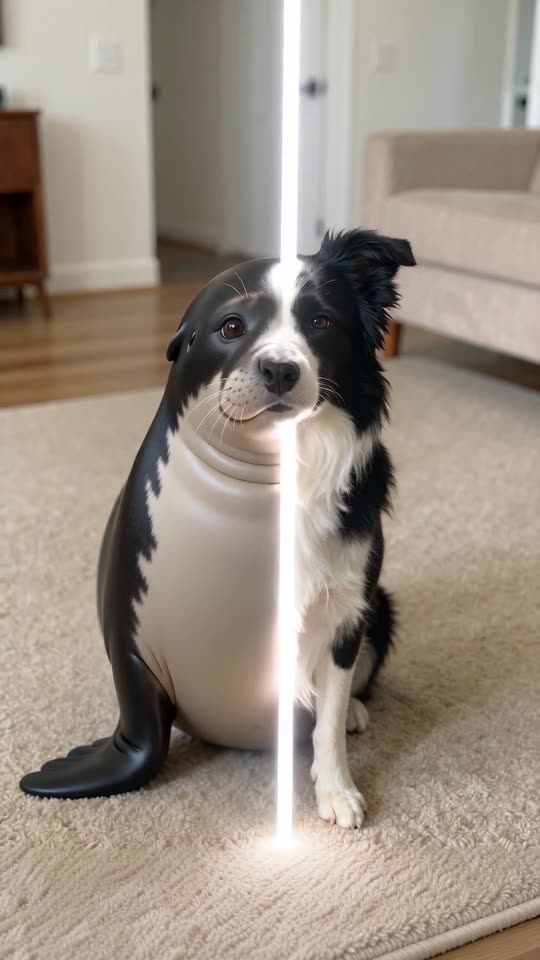
Photo to seal, step by step
- Open the generator on the template page. There is one upload box. Fill it with a crisp picture of a single dog or cat, ears to paws in view.
- Choose what it turns into. The default is a seal. A penguin, a sea otter, a piglet and a hamster are also on offer.
- Choose the place and the line colour. Your photo's own place and a white line are the defaults, and each has four other options.
- Pick a shape. Choose 9:16 or 16:9.
- Give consent and sign in with Google.
- Check a bonus preview (5 seconds, 480p) for the face and the sweep.
- Render the full clip. It takes 1 credit and lands in My videos as an MP4.
The beats built in
Two seconds of stillness, two seconds of sweep, then the last stretch holds the finished seal and its blink.
Once it has rendered
Your MP4 and a share link are waiting in My videos. Any sound you like can be added inside TikTok.
Pet Seal Filter, answered
Do I have to type anything?
No. The camera and the timing are locked in. You supply a photo and pick presets.
Does a photo with a busy background work?
It can, but a tidy background keeps the pet clear. Pick your photo's own place and the room stays; pick another place and the background is replaced.
May I shut the tab while it renders?
Yes. The job keeps running on our servers and the video is saved to My videos under your account.
Meet your pet as a seal
Upload a photo, receive a seal. The full video has no watermark, and nothing renews on its own.
Make my video