Making a Dog Dance Crew video with AI, step by step
Updated:
Short answer
Here is the order: one pet photo, a stage and an outfit, a 5-second bonus preview to check the face, then 1 credit for the 15-second 720p render. Save the MP4 and lay the TikTok sound over it from 0 seconds.
Choosing a photo and a stage
- One pet, as much body as you have. Dogs, cats and other pets work; people do not. Keep other animals out: the three dogs beside yours are generated, and a second animal in your photo gives the model extra shapes to copy. Files: JPG, PNG or WebP, up to 10 MB, shot from the front in daylight and without filters, with head, ears and eyes clearly visible.
- Stage: the black mirror floor is preselected and gives the cleanest background; neon, living room and lawn are the others. Lead's outfit: nothing, a bow tie, sunglasses or a red collar. Neither choice changes what you pay.
- Orientation: vertical 9:16 for short-video apps, wide 16:9 for YouTube or a monitor.
- Before you pay: accept the photo consent and sign in with Google. A pack is where the bonus previews come from, so buy one if your balance is empty. It all works in a phone browser; nothing needs installing.
- Check the preview. It runs 5 seconds at 480p. Heads that barely move usually mean a side view or a covered face, and a front-facing photo solves it.
- Rendering: one credit produces the 15-second 720p MP4 without a watermark. It takes a few minutes, and the tab can be closed; find the file under My videos.
What is built into the scene
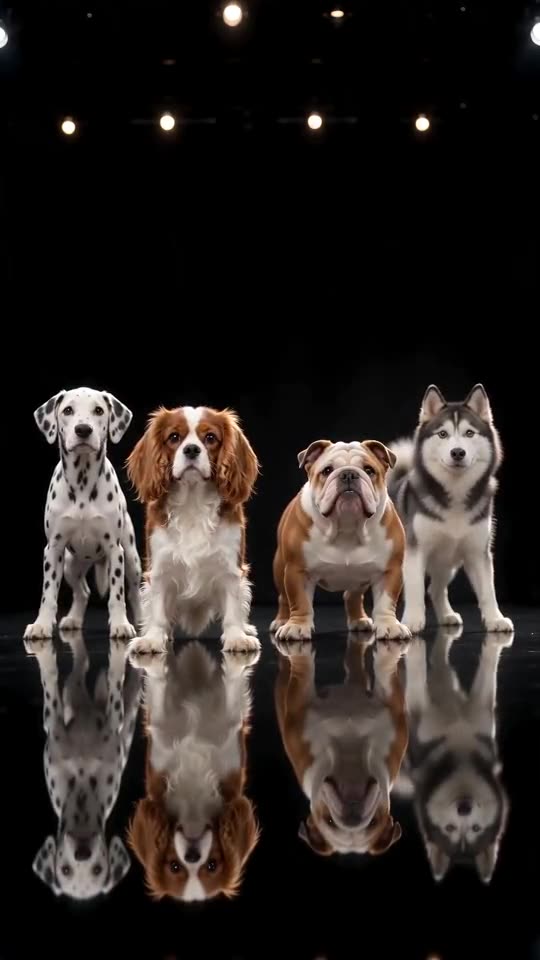
The camera sits at floor level, as if a phone were propped on the ground, and your pet fills second place in a line of four. The Dalmatian on the far left and the Bulldog and Husky on the right never change, because the line-up is the joke. In the first second all four dip together. Then they nod, and until the five-second mark they swing their heads from side to side. Quick tilts come first, steady shaking follows, and the last few seconds are an open-mouthed happy pant towards the camera.
Cats and other small animals are given softer moves on purpose. There is nothing to edit; the only thing left to add is the sound.
Lining up the sound
Take the silent version into TikTok, tap Add sound, and choose the one attached to @world.winnie's post, which is the clip we follow. Begin it at 0 seconds and every dip and shake lands where it should. That post runs roughly 18s; ours is its first 15.
Ozil Goal AI stands apart from the people behind the trend, TikTok and CapCut: it is independent, and none of them made it.
Questions people ask
Is any editing needed afterwards?
No. The file is finished and timed, and the sound is the only thing to add.
How soon is the video ready?
Usually a few minutes. You may shut the tab; the finished file waits under My videos.
Does it work from a phone?
Yes, in any mobile browser, nothing to install. Pick the picture from your camera roll, look at a bonus preview, then save the result and post it on TikTok, Reels or Shorts.
Start your own crew video
A pet photo is all you add; 15 seconds of HD arrive from $8.88. There is no subscription and the finished video carries no watermark.
Make my video