How do I create a Fridge POV Tiramisu AI video?
Updated:
Short answer
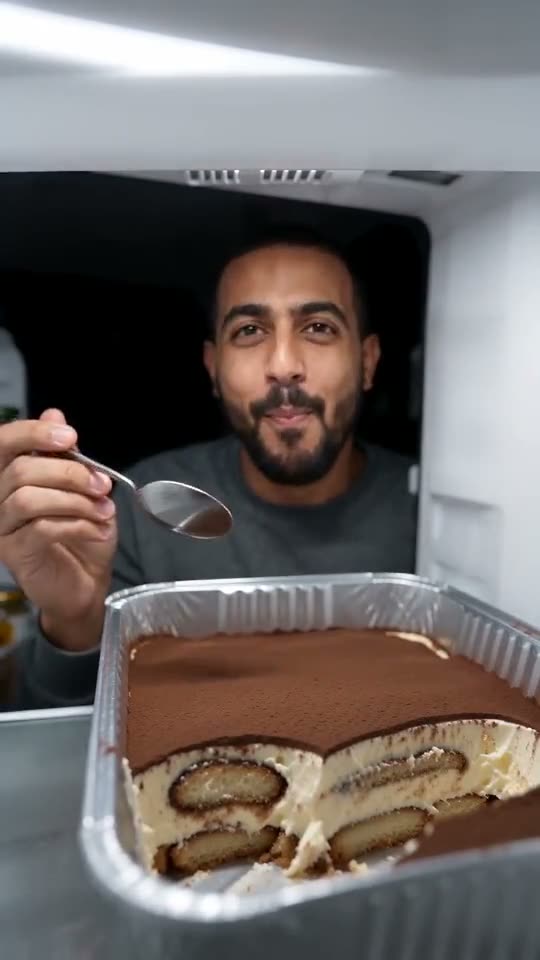
Start with a head-and-shoulders or waist-up photo of a lone adult, choose dessert, fridge and outfit, and Ozil Goal AI stages the fridge scene. A 5-second bonus preview comes first; once it looks right, 1 credit buys the 8-second 720p video, and TikTok is where the sound goes on.
The steps
- Go to the template page. Upload one sharp, front-facing photo of a single adult, head-and-shoulders or waist-up, mouth clear, since the face has to survive every bite. Pets, toys, groups and minors are refused. Formats: JPG, PNG, WebP, max 10 MB.
- Choose the extras. Dessert: classic (default, best tested), pistachio, strawberry, matcha. Fridge: bright white (default), mint retro, steel and glass, dorm mini. Outfit: what you wear, pyjamas, a robe or a hoodie. Prices never move.
- Set the shape: 9:16 suits TikTok, Reels and Shorts, while 16:9 suits YouTube and desktop.
- Consent and login. Agree to photo consent, then sign in with your Google account. Previews arrive with a pack, so buy one if your balance is empty.
- Read the preview. 5 seconds in 480p, same scene, lower quality. Watch for one spoon, a hole forming in the tray and your face holding steady mid-bite.
- Render: one credit produces an 8-second 720p MP4, unwatermarked and stored in My videos.
- Add sound in TikTok; the source post uses a creator's own sound that you can pick there.
What the camera does
The lens never moves: it sits in the fridge under the light, tray up front. You hover the spoon and glance at the lens (0 to 1s), swallow a first big mouthful (1 to 2.5), reach in from the front corner while a hole opens (2.5 to 5), take a third (5 to 7) and eye the tray again, pleased (7 to 8).
Bringing a spoon to a mouth is the hardest thing for the AI, so a bent spoon, an odd hand or a smooth tray happens. It is an ordinary miss and not a broken render, and the next run can come out cleaner. Behind you the kitchen stays near black.
Background
Your MP4 and share link are in My videos. Our clip mirrors the first 8 seconds of @westindianbella's TikTok from 19 October 2026, caption removed. How to put that sound on is in the sound guide.
Ozil Goal AI stands apart from TikTok and from whoever posted the trend.
What people ask
Is a prompt required?
No. Fridge, locked camera and scoop order are preset; you choose a photo plus dessert, fridge, outfit and shape.
May I close the tab during rendering?
Yes. The render carries on remotely and the result lands in My videos on your account.
9:16 or 16:9?
Use tall 9:16 for TikTok, Reels and Shorts, and wide 16:9 for YouTube and desktop. Previews come in both.
Your face behind the tiramisu tray
Send one photo, get 8 seconds of HD back, starting at $8.88. Nothing renews, and the finished file has no watermark.
Make my video