Veo prompt: Singing Pet
Updated:
Short answer
Paste the prompt below into Veo, set your pet photo as the first frame and choose 9:16. Towel, dryer mic and four beats are all in it. Veo may add its own audio, so export without sound or mute it before putting the trend's sound on.
The prompt
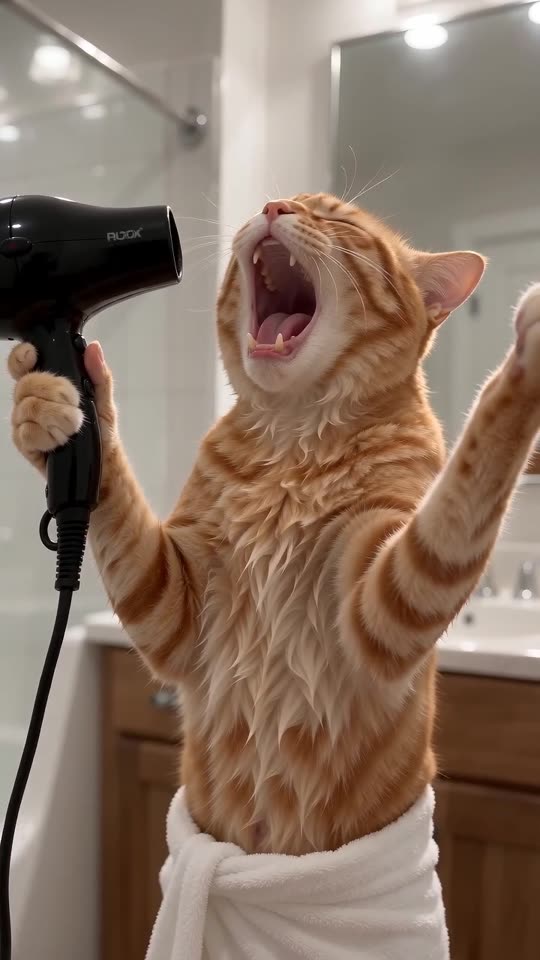
Vertical 9:16, about 10 seconds, one unbroken shot from a phone fixed at chest height in a bright home bathroom. Using the supplied photo, the SINGER is that exact animal, with the same species, face, fur colours and markings. It rises onto its back legs like a person, a fluffy white bath towel knotted around its waist and its fur slightly damp, and grips a black hair dryer beside its head as a microphone while the free paw goes up. During the first two seconds its head tips back and its mouth opens wide on a big opera note. Between two and five seconds it rocks its head from side to side with eyes shut, then gazes at the ceiling. Between five and eight seconds the dryer sweeps across to its mouth, it leans toward the camera, and it fixes the lens with a perfectly straight face. In the final two seconds its head goes fully back for one long closing note and the raised paw shakes. Sound is a swelling orchestral instrumental with a faint bathroom echo, and nobody sings or speaks: no vocals, no howling, no lyrics. Realistic look and natural movement; keep the frame free of text, subtitles, logos and any watermark.
Hints
- Pick a bright, sharp, front-on pet photo.
- Stay close to 10 seconds.
Questions people ask
Does Veo hold on to a pet's markings?
Often, as long as the photo is crisp and well lit.
Do I need the 9:16 setting?
Yes. Pick vertical 9:16 so the framing matches the trend.
Should I mute the result?
If you plan to add the trending sound, yes. Two audio tracks clash.
Put your own pet on the bathroom mic
A single pet photo gets you in. Every pack includes bonus previews, so you can check your photos before spending a credit. You pay once per video, never monthly.
Make my video